Running a private practice often means spending more time on admin work than actual client care. On average, mental health professionals lose 10 hours weekly to tasks like documentation, scheduling, insurance claims, and emails. Here’s how to cut down that time with practical strategies:
- Use practice management software: Centralize scheduling, billing, and records to save hours and reduce errors.
- Automate scheduling and reminders: Let clients self-book, reducing back-and-forth communication and no-shows.
- Leverage voice-to-text tools: Speed up documentation by speaking instead of typing, saving up to 10 hours weekly.
- Simplify billing and payments: Automate invoices, insurance claims, and payment tracking to minimize manual errors.
- Create templates and checklists: Standardize workflows to save time and ensure accuracy.
- Delegate and batch tasks: Outsource non-clinical work and group similar tasks to improve efficiency.
- Track and analyze data: Identify inefficiencies and optimize workflows for better time management.
These strategies help reclaim time for client care while maintaining compliance and accuracy. Start small – automate one process or delegate a routine task – and build from there to lighten your workload.
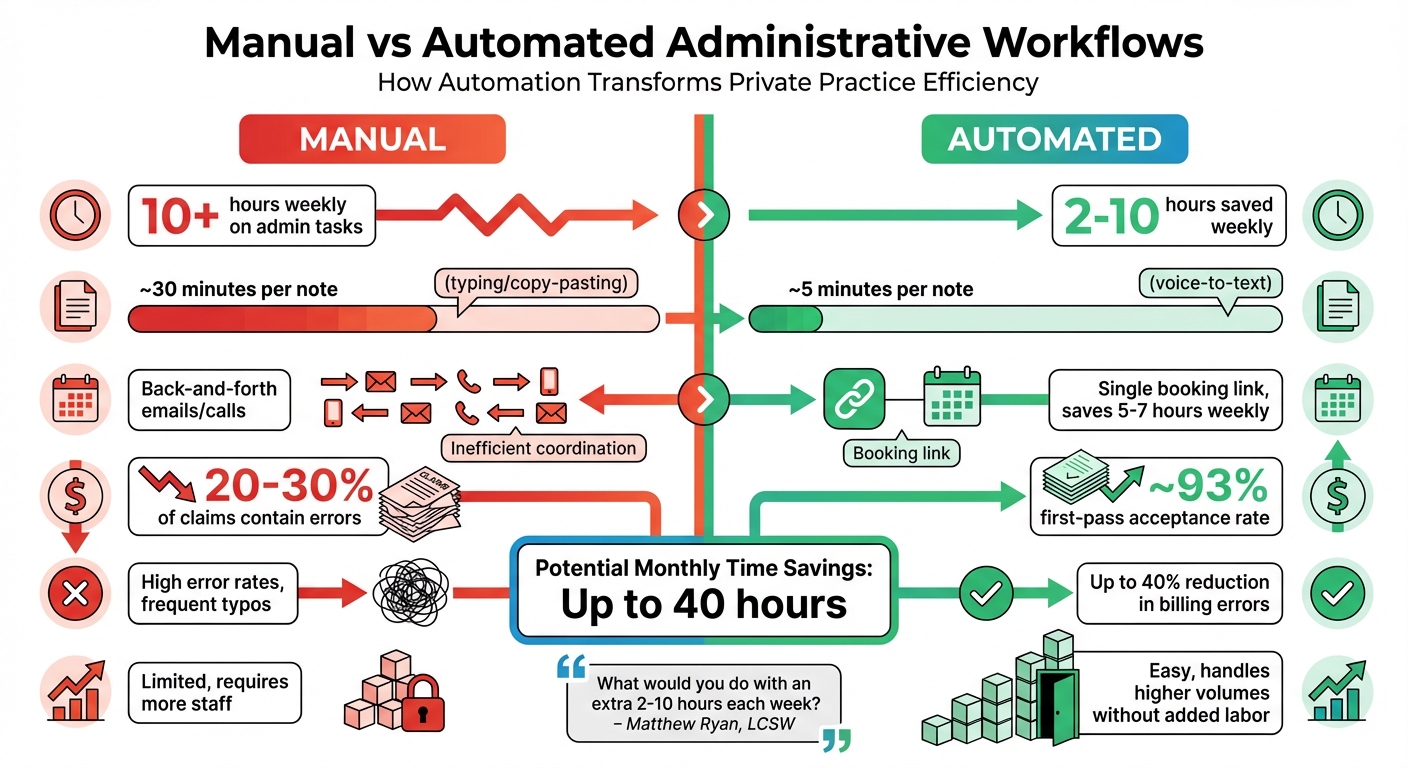
Manual vs Automated Administrative Workflows: Time Savings Comparison
The Power of Automation in Private Therapy Practices: Save Time / Reduce Stress
1. Centralize scheduling and records with practice management software
Switching between multiple platforms for scheduling, records, billing, and communication is a productivity killer. Every time you juggle systems, you lose focus and waste time. A centralized practice management system solves this by consolidating everything into one streamlined platform.
Time savings per week
Mental health clinicians spend a lot of time on administrative tasks, but a centralized system can drastically cut that down. For instance, client portals allow for self-booking, form submissions, and invoice payments – saving up to 90% of the two hours typically spent on scheduling tasks. Built-in documentation templates like SOAP or DAP notes, along with shortcuts for frequently used phrases, can reduce the 3–4 hours clinicians typically spend on note-writing each week. Beyond saving time, these systems also help protect your practice.
HIPAA compliance and data security
Compliance can be complicated, but centralized platforms simplify it by handling the heavy lifting for you. Look for systems with features like 128-bit SSL encryption, HITRUST certification, and automated audit trails to ensure every access or update to client records is tracked. Multi-factor authentication, automatic session timeouts, and encrypted backups further safeguard sensitive data and provide disaster recovery options. Before uploading client information, confirm that the vendor will sign a Business Associate Agreement (BAA) – this is a must for HIPAA compliance.
Reduction in manual errors
Real-time updates ensure everyone on your team has access to the most current information, helping to eliminate double-bookings or scheduling conflicts. A clinical study found that switching from paper to a centralized electronic system improved data accuracy from 80.96% to 100% and cut documentation time from 120 minutes to just 45 minutes. Integrated billing features pull directly from clinical notes, reducing duplicate data entry and cutting billing errors by up to 90%. Automated insurance verification flags eligibility problems before a session begins, saving you hours of rework and reducing claim rejections. These tools work together to simplify daily operations and minimize errors.
Ease of integration with existing workflows
Modern practice management software is designed to fit seamlessly into your current processes. Calendar syncing with platforms like iCal, Google Calendar, or Outlook lets you manage both personal and professional schedules in one place. Mobile apps make it easy to check appointments, complete notes, or process payments on the go. Many systems also include HIPAA-compliant video conferencing, automatically generating session links for scheduled appointments. As Bryan Aston, LCSW, puts it:
"The benefits are priceless. The time saved is invaluable. Do your research into quality and qualified services".
2. Automate appointment scheduling, reminders, and intake forms
Scheduling manually can be a huge drain on time. Endless back-and-forth emails or voicemails just to lock in an appointment can take up hours every week. Automation changes the game by letting clients manage their own bookings through self-service portals. Add in automated reminders and digital intake forms, and you’re not just saving time – you’re also ensuring greater accuracy in scheduling.
Time savings per week
Automating scheduling is a smart way to reclaim hours for client care. On average, mental health clinicians lose about 2 hours weekly to handling appointments manually. By switching to an automated system, a typical practice can save 5–7 hours per week. Digital intake forms are sent automatically when appointments are made, ensuring you have all the necessary client information upfront. Plus, with real-time calendar syncing, double-bookings become a thing of the past as your availability updates across all platforms instantly.
Reduction in manual errors
Automation helps eliminate common scheduling mistakes. By keeping your availability updated in real-time, it prevents double-bookings and avoids gaps in your schedule that can frustrate clients. Digital intake forms use conditional logic to show only the relevant questions, which not only saves review time but also improves data accuracy. Automated reminders, sent via SMS or email 24–48 hours before appointments, have been shown to reduce no-shows by up to 30%, according to TheraTrack. These reminders also boast an impressive 98% open rate, making them far more effective than traditional phone calls. One healthcare organization even reported cutting its scheduling staff by 25%, saving $170,000 annually after adopting automation. These improvements make automation a practical and efficient addition to any practice.
Ease of integration with existing workflows
The best automation tools fit right into your current systems. For example, potential clients can book consultations directly through a scheduling widget embedded on your website. Tools that sync with your EHR ensure client data is transferred automatically, eliminating the need for manual data entry. When paired with centralized record systems, these integrations streamline the entire workflow. Plus, with tools offering 24/7 accessibility, clients can book appointments at their convenience – studies show that 34% to 51% of self-scheduled appointments happen outside regular office hours. This round-the-clock accessibility ensures your practice doesn’t miss out on potential bookings.
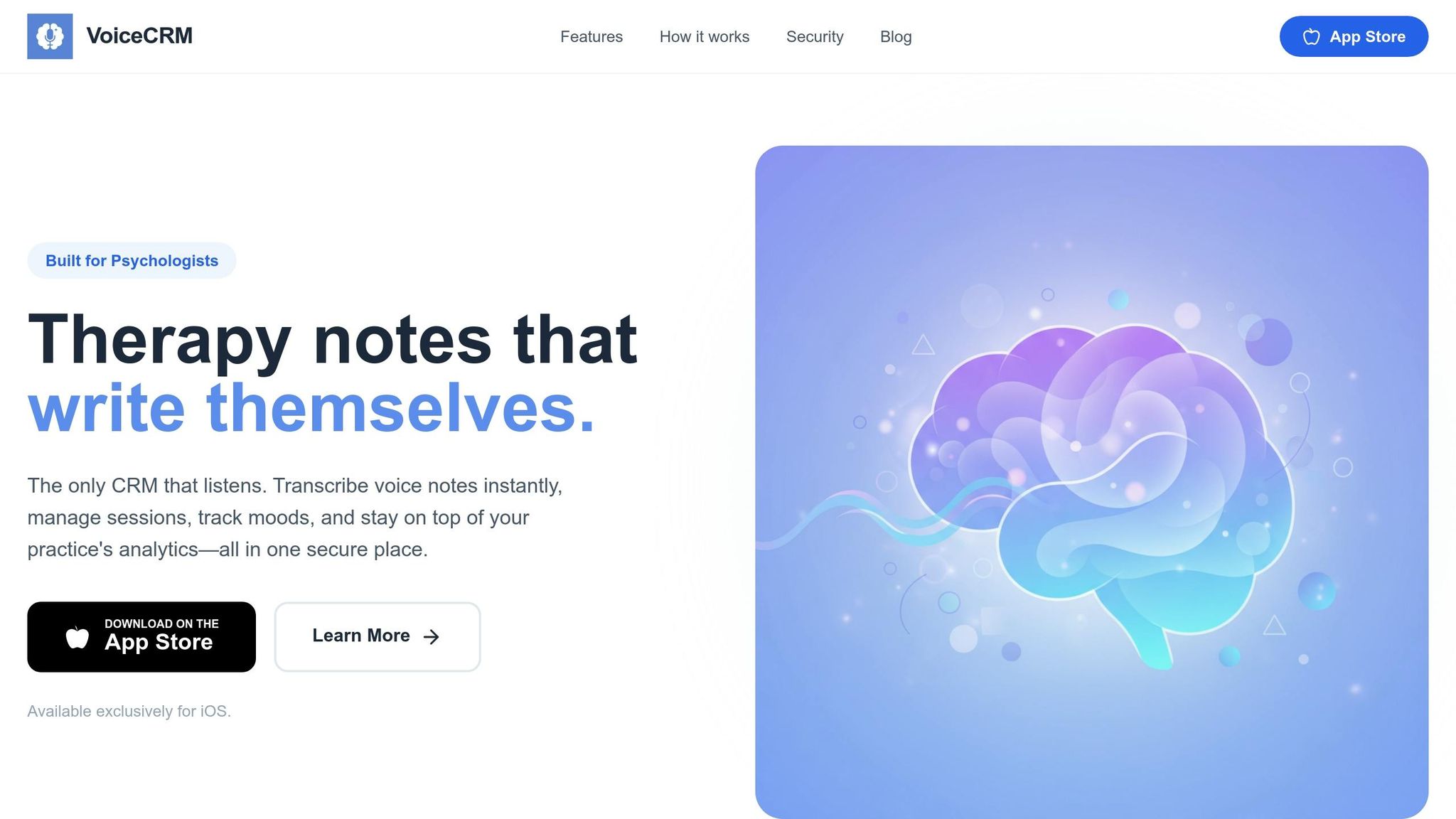
3. Use voice-to-text tools like Voice CRM for faster documentation
Clinical documentation often eats up a significant chunk of time. In fact, 63% of physicians spend at least an hour on after-hours charting – commonly known as "pajama time".
Time savings per week
Speaking is inherently faster than typing. Most clinicians speak at a rate of 120–160 words per minute, which is 3 to 7 times faster than the typical typing speed of 40–60 WPM. This speed advantage translates into substantial time savings. Mental health professionals using voice-to-text tools can reclaim 2–10 hours each week, with some saving as much as 40 to 90 minutes daily. One study reported a 43% reduction in documentation time per note – cutting the average from 8.9 minutes to just 5.1 minutes. Tools like ambient AI enhance this efficiency by working in the background, capturing session details without disrupting the flow. The technology automatically organizes conversations into structured templates like SOAP, DAP, or BIRP notes, removing the need for manual data entry across multiple EHR fields. This streamlined process frees up time, making workflows smoother and more efficient.
HIPAA compliance and data security
While saving time is important, safeguarding patient information is critical. Professional-grade voice-to-text tools tailored for healthcare use AES-256 encryption to secure data both at rest and in transit. They also employ multi-factor authentication and role-based access controls to ensure only authorized personnel can access sensitive information. What sets medical-grade tools apart from consumer options is the inclusion of a Business Associate Agreement (BAA), which legally obligates vendors to adhere to HIPAA regulations. Consumer tools like Siri or the free version of ChatGPT lack BAAs and may use your input to train AI models, making them unsuitable for clinical settings. Voice CRM, on the other hand, provides HIPAA-compliant security with AES-256 encryption, multi-factor authentication, and a BAA to ensure end-to-end protection.
"They have a business associate agreement, so you don’t have to worry about HIPAA compliance there. It is a lifesaver. It will change your life, and you will have more time to be present with your patients." – Amber McKinney, LCSW, Mentalyc
Reduction in manual errors
Specialized medical voice-to-text tools significantly improve accuracy by being trained on clinical and psychiatric terminology. This includes shorthand like "SI/HI denied" or specific medication names, reducing the need for time-consuming corrections. Studies have shown a 47% drop in documentation errors when using AI-powered transcription tools. One healthcare organization reported an increase in accuracy from 85% to 97% after adopting a leading medical-grade solution. These tools also reduce distractions by eliminating the back-and-forth between listening and manual note-taking.
Ease of integration with existing workflows
Efficiency extends beyond documentation speed – Voice CRM integrates seamlessly with existing practice management systems, saving even more time. By connecting directly with these platforms, the tool eliminates the need for "copy-and-paste" tasks. Modern systems use zero-shot learning to instantly interpret clinical terminology. For therapists using EHR systems, direct API integration ensures that voice data is automatically transferred into patient records. This setup allows clinicians to dictate notes immediately after a session and move on with their day, avoiding late-night charting.
"Chart burnout is such a real thing!! I cannot tell you how joyful it was to go home and watch a movie last night knowing that my work was done before I left the office." – Anne Fuller, APRN, PMHScribe
4. Simplify billing, payments, and financial tracking
Time savings per week
Managing billing and finances often eats up a big chunk of time for psychiatrists – about 8 hours per week on administrative tasks, with 2 hours just for insurance eligibility and prior authorization. Practice management software can dramatically streamline this process by automating tasks like generating invoices, superbills, and payment reminders. Instead of constantly switching between clinical duties and administrative headaches, you can group tasks like insurance calls, eligibility checks, and billing reconciliation into a focused 60–90 minute block.
Securely storing client payment information allows for automatic billing at the time of service, cutting out the hassle of chasing unpaid invoices. Systems that handle electronic claims can batch submissions and use Electronic Remittance Advice (ERAs) for automated payment processing. Plus, tools for instant insurance verification eliminate the usual back-and-forth during client intake. These time-saving methods also prioritize data security.
"Your administrative workload is your ‘non-billable’ work… Being able to rely on automation will reduce your overhead." – Avivit Fisher, Author
HIPAA compliance and data security
Financial documents like invoices and claims often include Protected Health Information (PHI), such as client names, service details, and CPT or ICD-10 codes. This makes HIPAA compliance essential. Any software handling this data must have a Business Associate Agreement (BAA) in place.
Popular payment platforms often aren’t HIPAA-compliant and may even prohibit healthcare transactions in their terms of service. Instead, using an Electronic Health Record (EHR) system with integrated payment processing ensures that all financial data stays within a secure, compliant environment. These systems use bank-level encryption and maintain detailed audit trails to protect confidentiality.
"As soon as you put the client’s full name, the service performed, or a CPT or ICD-10 code on your billing document, it’s considered PHI – and that falls under HIPAA regulations." – Jill Shook, MS, CCC-SLP
Reduction in manual errors
Automated billing systems validate data in real-time, which helps ensure the correct ICD-10 and CPT codes are used. This reduces the likelihood of insurance rejections and the need for time-consuming appeals. For context, 65% of physical therapists report spending over 30 minutes preparing an appeal for a single denied claim.
With integrated databases of diagnostic and procedure codes, insurance claims are submitted accurately, speeding up reimbursements. Manual data entry, on the other hand, increases the risk of typos or outdated codes, which automation eliminates entirely. Plus, self-service portals give clients easy access to their billing history, cutting down on back-and-forth communication.
Ease of integration with existing workflows
Modern EHR systems can sync session data directly with invoices, removing the need to manually transfer information between platforms. For example, manually entering a transaction from an external processor takes about 1 minute – which equates to an effective pay rate of just $12 per hour for that administrative work.
Signing up for Electronic Remittance Advice (ERAs) and Electronic Funds Transfer (EFT) with insurance payers automates payment posting and enables direct deposits. This integration allows you to spend more time on client care while the system handles the financial details. Separating business and personal bank accounts and using online payment systems with digital recordkeeping also simplifies tax preparation and year-end accounting.
"The less time you have to spend on tedious work with minimal financial benefit, the more time you’ll have to do work that matters – and pays – more." – Ben Caldwell, PsyD, LMFT
sbb-itb-ce1c1e8
5. Create standard workflows with templates, checklists, and reminders
Using templates, checklists, and reminders can simplify your administrative workload, saving time and reducing errors.
Time savings per week
Templates are a lifesaver when it comes to cutting down on repetitive tasks. For example, progress notes can be completed in under five minutes per session when using templates. Briana Farlow Reynolds, LCSW, shared her experience:
"That one shift cut my documentation time in half. I can finish 6 progress notes in less than 30 minutes".
Email templates for recurring scenarios – like responding to new client inquiries, handling late cancellations, or providing superbill requests – can save you 60-90 minutes each week by eliminating the need to type the same information repeatedly.
Reduction in manual errors
Checklists embedded within templates ensure you don’t overlook critical details. For example, mandatory insurance elements – such as start/stop times, CPT codes, and medical necessity documentation – are easy to include, protecting you during audits and avoiding costly recoupments. As Briana Farlow Reynolds explains:
"A solid template gives you a safety net and peace of mind… It removes the mental load of remembering what needs to be included every time".
Automated systems with real-time validation also help catch mistakes before they become issues. TheraPlatform highlights that "having information automatically validated in real time through technology leads to cleaner data" compared to manual entry, which can be prone to errors from speed or misinterpretation. Features like drop-down menus for diagnoses and interventions not only speed up data entry but also improve accuracy.
Ease of integration with existing workflows
Modern EHR systems are designed to connect scheduling, intake forms, and billing seamlessly, reducing the need for duplicate data entry. It’s important to make sure your templates align with how you naturally work. Sunni Jones-Ford, LCSW, sums it up perfectly:
"Templates free up mental space to add meaningful details because you’re no longer rephrasing and reorganizing the same foundational information".
To further simplify your workflow, consider offering pre-set time slots for rescheduled sessions. This eliminates the back-and-forth of scheduling make-up appointments. Additionally, batching administrative tasks can reduce the mental strain of constant interruptions. For instance, dedicate 30-60 minutes daily to email and 2 hours weekly to billing to keep tasks manageable and focused.
6. Delegate and batch routine tasks
Once you’ve streamlined your systems and automated key processes, the next step is to delegate and batch routine tasks. While automation handles much of the heavy lifting, handing off non-clinical responsibilities to others can reclaim even more time and energy.
Time savings per week
Delegating non-clinical tasks to virtual assistants or support staff can save a surprising amount of time. According to Isaac Kassab from Pearl Talent, "physicians spend approximately 44.64% of their time on administrative tasks". Imagine freeing up just three billable hours per week by outsourcing tasks like insurance eligibility checks or billing follow-ups – it could easily cover the cost of hiring help. Plus, virtual assistants can cut payroll and operational expenses by as much as 78% compared to in-house staff.
Batching tasks is another game-changer. For example, setting aside two specific times each day to handle emails or dedicating one focused session to billing can reduce the constant context switching that eats away at productivity. Dr. Sahar Yousef, a cognitive neuroscientist at UC Berkeley, explains:
"The human brain works best when it focuses on one thing at a time. We have a certain amount of cognitive capacity and a certain amount of attention".
It takes an average of 23 minutes to regain focus after an interruption. Pairing delegation with batching creates a powerful system that reclaims hours for client care.
HIPAA compliance and data security
Virtual assistants can easily fit into HIPAA-compliant workflows when you use secure, cloud-based EMR systems. Hiring through specialized agencies ensures assistants are trained in secure communication protocols and have undergone thorough background checks. Tools like LastPass for password management and remote monitoring software add an extra layer of security. To maintain HIPAA compliance, make sure contractors handling protected health information sign a Business Associate Agreement (BAA).
Reduction in manual errors
Small mistakes in tasks like insurance verification or CPT coding can lead to denied claims or delayed payments. Virtual assistants with specialized training in these areas help ensure accuracy. They can also take over calendar management, reducing double bookings and ensuring appointment reminders go out on time, which helps minimize no-shows. Vivian Chung Easton, LMFT, CHC, from Blueprint puts it this way:
"Effective delegation isn’t about avoiding responsibilities. It’s about strategically distributing tasks to make room for what you do best – providing excellent therapeutic care".
Ease of integration with existing workflows
Many virtual assistants are already familiar with popular therapy EMRs like SimplePractice, TheraNest, and TherapyNotes, so they can get up to speed quickly. Start by closely supervising their work and conducting regular checks, then gradually reduce oversight as they demonstrate competence. Focus on offloading tasks that don’t require a clinical license – like resending intake forms or verifying insurance eligibility – to free up your time immediately. This approach ensures a smooth integration into your existing systems while maintaining efficiency and consistency.
7. Track practice data to find and fix workflow problems
If you want to improve, you need to measure. Tracking how you spend your time can reveal inefficiencies that might be slowing you down. Start with a simple one-week audit of your administrative tasks. Log every minute spent on activities like clinical documentation, scheduling calls, voicemail exchanges, and insurance authorizations. This exercise can highlight areas where time is slipping away. For instance, you might discover you’re spending 60–90 minutes each week just searching for handouts. Creating a centralized resource library based on this insight could save you a significant chunk of time right away.
Electronic Health Records (EHRs) can also help by generating automated reports on revenue trends, appointment patterns, and no-show rates. These reports give you data you can rely on instead of guessing. As psychologist and neuroscientist Daniel Levitin wisely puts it:
"The obvious rule of efficiency is you don’t want to spend more time organizing than it’s worth".
With this information in hand, you can focus on automating or delegating tasks that offer the biggest time savings.
Spotting and reducing manual errors
Tracking your billing data is another way to pinpoint recurring problems that could be costing you money. For example, monitor your claim denial rate every month using this formula: (Total claims – Accepted claims) ÷ Total claims. If denial rates are climbing, the underlying issues often stem from things like exceeding authorization limits, missing documentation, or errors in CPT coding. AI tools can help here by flagging coding mistakes before claims are submitted, catching errors in real time and reducing the average 18% denial rate for in-network claims.
To save time on documentation, try using color-coded progress notes. Highlight medical necessity in one color, interventions in another, and client progress in a third. Any content left unmarked is likely unnecessary and can be removed. This approach not only reduces redundancy but also streamlines your workflow.
Comparison Table
Below is a side-by-side look at how automation reshapes routine administrative tasks, contrasting manual workflows with automated solutions.
| Feature | Manual Workflows | Automated Tools (Voice CRM, Practice Management Software, Digital Intake) |
|---|---|---|
| Time Investment | High; over 2 minutes per repetitive task, adding up to 10+ hours weekly | Minimal; tasks finish almost instantly, saving 2–10 hours weekly |
| Documentation | Requires manual typing or copy-pasting; ~30 minutes per note | Voice-to-text transcription completes notes in ~5 minutes |
| Scheduling | Involves back-and-forth emails or phone calls | Simplified with a single booking link and real-time calendar sync, saving 5–7 hours weekly |
| Error Rates | High; typos and billing errors are common | Lower; AI-powered claim scrubbing reduces billing errors by up to 40% |
| Billing Accuracy | 20–30% of claims contain errors | Automated claim editors achieve ~93% first-pass acceptance rates |
| Initial Setup | Minimal; relies on paper or basic email systems | Moderate; includes software setup, template creation, and staff training |
| Ongoing Maintenance | High; requires frequent manual follow-ups | Low; automated triggers and batch processing handle it |
| Scalability | Limited; more staff needed as workload grows | Easy; manages higher volumes without increasing labor costs |
"What would you do with an extra 2–10 hours each week? … These automations have completely transformed how I run my practice."
– Matthew Ryan, LCSW
While automation may require some upfront effort, the long-term benefits are undeniable. By streamlining small, repetitive tasks, you could save up to 40 hours every month. This comparison highlights just how much efficiency automation can bring to your practice.
Conclusion
Simplifying administrative tasks isn’t just about cutting down on time – it’s about freeing yourself up to focus on what truly matters: your clients. When you’re not buried under endless paperwork, you can connect more deeply during sessions, make sharper clinical decisions, and protect yourself from burnout. This shift doesn’t just clear your schedule; it elevates the care you provide.
As Sunni Jones-Ford, LCSW, explains:
"When your workflow supports you, you become more grounded, more intentional and more easeful."
The seven strategies outlined here tackle the common administrative hurdles that can drain your energy week after week. They work together to create a system that supports your clinical work. Start by tracking your administrative tasks for one week to pinpoint the biggest time drains. Then, make one impactful change at a time – like introducing self-scheduling to cut out the back-and-forth of booking appointments.
And remember: automation isn’t about doing more; it’s about working smarter. The right tools aren’t just time-savers – they’re enablers, allowing you to focus on your expertise while they handle repetitive tasks. Test out options with free trials, group similar tasks into focused time blocks, and create resource kits to slash the time spent searching for information from 30 minutes to just 30 seconds.
Your practice should work for you, not wear you out before your first client even walks in the door. By adopting even a few of these strategies, you can reclaim hours lost to admin work and channel that time into client care and your own professional development. Start making these changes today to take back control of your time and energy. A streamlined workflow means more space for what truly matters.
FAQs
Which admin task should I automate first?
One of the easiest ways to reclaim your time is by automating appointment scheduling. This simple change can free up as much as 5–7 hours each week while also cutting no-shows by up to 30%.
To make it work seamlessly, choose a HIPAA-compliant scheduling tool. Look for features like:
- Integration with your existing calendar
- Automatic email or SMS confirmations and reminders
- Online booking options that let clients manage their own appointments
This setup not only streamlines your workflow but also makes scheduling more convenient for your clients.
What makes a tool HIPAA-compliant?
A tool meets HIPAA compliance standards if it safeguards the confidentiality, integrity, and security of protected health information (PHI). To achieve this, it typically includes features like encryption to protect data, secure access controls to limit who can view or edit information, and audit trails to track activity, ensuring adherence to HIPAA regulations.
How do I track if automation is working?
To see if automation is making a difference in your private practice, keep an eye on a few critical metrics. Look for things like less time spent on administrative tasks, fewer no-shows, and more efficient workflows overall. Tools with real-time analytics can help you track these changes and spot areas that need attention.
Set clear goals – like aiming to save a specific number of hours each week – and check in regularly to evaluate your progress. This way, you can make sure the automation tools you’re using are delivering the results you need.