Therapists often juggle clinical care and administrative tasks, and choosing between EHR (Electronic Health Record) and CRM (Customer Relationship Management) software depends on your practice’s specific needs. Here’s the breakdown:
- EHRs are designed for clinical documentation, treatment plans, compliance, and billing. They help manage patient care during therapy sessions and ensure regulatory standards are met.
- CRMs focus on managing client relationships before they become patients. They handle inquiries, follow-ups, and engagement, improving communication and lead management.
Key Takeaways:
- EHRs are essential for clinical operations like SOAP notes, insurance claims, and compliance.
- CRMs excel in client engagement, lead tracking, and marketing before therapy begins.
- Many practices benefit from using both systems to cover the entire client journey.
Quick Comparison
| Feature | EHR (Electronic Health Record) | CRM (Customer Relationship Management) |
|---|---|---|
| Purpose | Clinical care, documentation, billing | Client engagement, lead tracking |
| Compliance | HIPAA, ONC-certified | HIPAA (requires BAA) |
| Implementation | 3–6 months | 2–4 weeks |
| Best For | Therapists managing clinical workflows | Practices focused on client communication |
If you’re struggling with documentation or billing, choose an EHR. If you’re missing client follow-ups or need better engagement, go for a CRM. For growing practices, combining both might be the best approach.
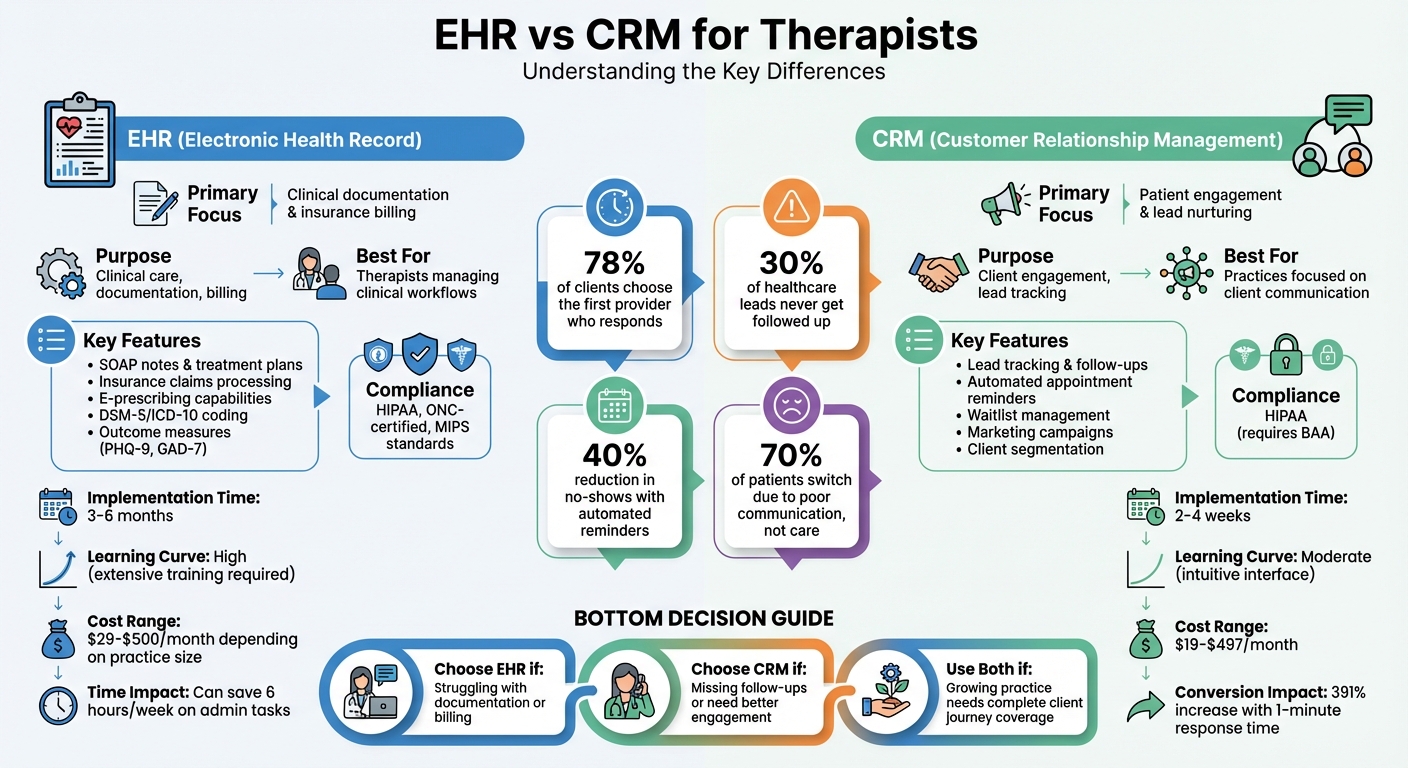
EHR vs CRM Software Comparison for Therapists
The Tools I Use to Run My Therapy Practice in 2026 (EHR, CRM, Marketing & More)
sbb-itb-ce1c1e8
What is EHR Software?
Electronic Health Record (EHR) software transforms patient care by digitizing records, treatment plans, and compliance tasks, becoming the central hub for clinical operations – from documenting sessions to managing insurance claims.
The main purpose of EHR systems is to handle clinical documentation and meet regulatory standards. They adhere to HIPAA regulations, secure sensitive patient data with encryption, and track access through audit trails. To ensure compliance, reputable vendors also provide a legally mandated Business Associate Agreement (BAA) when dealing with protected health information.
"Your EHR system does more than manage practice tasks – it retains clients, ensures security, and cuts down on non-billable hours." – Avivit Fisher, Founder, REdD Strategy
For therapists, EHR tools are tailored to mental health needs, offering specialized note formats like SOAP, DAP, BIRP, and GIRP, alongside intake assessments and treatment plans.
Core Features of EHR Software
EHR platforms combine clinical and administrative tools into a single system. On the clinical side, they provide customizable templates for progress notes, treatment plans, and DSM-5/ICD-10 diagnosis codes. Many systems also feature built-in tools like PHQ-9 for depression and GAD-7 for anxiety, which automatically score assessments to track client progress.
On the administrative side, features include scheduling calendars, automated appointment reminders via SMS or email (reducing no-shows by up to 40%), client portals, digital intake forms, insurance claim submission, superbill generation, and credit card processing – all within a HIPAA-compliant framework.
For practices offering psychiatry, advanced EHR systems include Electronic Prescribing for Controlled Substances (EPCS) and integrate with state Prescription Monitoring Programs. Additionally, AI-powered note generation can save therapists 15–20 minutes per session, potentially reclaiming 5–7 hours a week for those seeing 20 clients.
How EHR Supports Mental Health Practices
EHR systems simplify day-to-day operations, making a noticeable difference in how practices function. Customizable templates with carry-forward features allow therapists to pull data from previous sessions, cutting down on repetitive tasks and ensuring continuity in care.
Group practices benefit from secure data-sharing capabilities while maintaining strict access controls. Supervisors can review and co-sign notes from interns or associates, with the system keeping a detailed log of all activity for accountability.
"The best therapy practice management systems function as both an electronic health record (EHR) and a practice management tool. This ‘all-in-one’ approach means you’re not bouncing between separate platforms for notes, claims, and calendar management." – Supanote
The financial advantages are clear. Advanced Revenue Cycle Management tools in EHR systems achieve up to a 98.7% first-pass acceptance rate for insurance claims, which helps minimize payment delays and administrative hassles. Automated billing functions further simplify the process by streamlining claim submissions, tracking payments, and generating superbills for clients who self-file.
EHR pricing is typically structured to match the needs of different practice sizes. Solo practitioners can expect costs between $29 and $150 per month. Small to mid-sized group practices often pay $99 to $250 per provider monthly, while larger practices with advanced requirements like e-prescribing might spend $200 to $500 or more each month. Additional charges may apply for features such as insurance billing (around $20–$30 per month), e-prescribing, or integrated telehealth services. This flexible pricing allows therapists to select plans that align with their specific needs and budgets.
With EHR systems covered, let’s shift focus to CRM software and how it enhances client engagement.
What is CRM Software?
While Electronic Health Records (EHRs) focus on clinical documentation, Customer Relationship Management (CRM) software is all about managing client interactions and engagement before they officially become clients. Think of it as the digital front office for your practice – handling inquiries, streamlining communication, and organizing everything that happens before someone books their first session. Unlike EHRs, which are designed for clinical operations, CRMs are built to simplify and improve the client intake process.
For therapists, this difference is crucial. A CRM collects leads from multiple sources – like Psychology Today profiles, website contact forms, phone calls, referrals, and even direct messages – into one easy-to-navigate dashboard. Why does this matter? Because over 30% of healthcare leads are never followed up on. And timing is everything: 78% of potential clients go with the first provider who reaches out, and responding within just one minute can boost your chances of converting that lead by an impressive 391%.
"Think of your CRM as your practice’s front office engine – everything that happens before someone becomes an active client." – Brand Your Practice
Unlike general business CRMs that focus on sales, therapy-focused CRMs are designed to support the therapeutic relationship. They follow the client journey from the very first interaction to ongoing care, keeping every detail – like missed calls, intake forms, or follow-up messages – organized and accessible. This can have a big financial impact too, with mental health practices often seeing a 30–50% improvement in lead conversion rates.
Key Functions of CRM Software
Therapy-specific CRMs combine communication tools with automation to make life easier for both therapists and clients. Here are some standout features:
- Unified Inbox: All your communication – whether it’s phone, text, email, or web chat – gets consolidated in one place, so you’re not juggling multiple apps.
- Automated Follow-Ups: Features like missed-call SMS alerts ensure no lead slips through the cracks.
- Digital Intake Forms: These integrate directly with client profiles, reducing manual data entry and making onboarding smoother for clients who may already feel overwhelmed.
- Clinician Matching Tools: Advanced platforms can match new clients to the right therapist based on factors like specialty, availability, insurance, and therapeutic approach.
- Waitlist Management: Automated alerts for cancellations help fill schedule gaps quickly, which is especially helpful for group practices.
- Client Segmentation: Tag clients as "New Lead", "Waitlisted", or "Inactive" to tailor follow-ups and re-engagement campaigns.
How CRM Improves Client Engagement
CRMs are designed to reduce the barriers that often prevent clients from starting or continuing therapy. Automated appointment reminders – sent via SMS or email – help cut down on no-shows, while mobile-friendly intake forms make it easier for clients to take that first step, even during vulnerable moments. Some platforms even offer one-click insurance verification, removing financial uncertainties that can delay treatment.
Therapists also gain valuable insights from CRM data. For example, you can track which marketing channels – like Google Ads, referrals, or directory listings – are bringing in the most suitable clients. This allows you to allocate your resources more effectively and get a better return on your marketing investment.
"A CRM helps you respond faster, match smarter, and deliver a better first impression – even before a therapist is involved." – Breksey
Some CRMs go a step further by offering tools like mood and progress tracking. These features create a visual timeline of a client’s journey, adding helpful context to clinical notes and giving therapists a fuller picture of their progress.
When it comes to cost, therapy CRMs range widely. Entry-level options like Plutio start at $19/month for up to nine active clients. On the other hand, more feature-rich platforms like TheraSaaS can cost between $197 and $497/month, depending on what’s included.
Next, we’ll break down the differences between CRMs and EHRs to help you decide which is the right fit for your practice.
EHR vs CRM: Main Differences
EHRs and CRMs serve different purposes within a therapy practice, even though both manage client information. Think of an EHR (Electronic Health Record) as your clinical filing cabinet – it handles everything that happens inside the therapy room. In contrast, a CRM (Customer Relationship Management) system is like your front office assistant, managing interactions before a client becomes active. This distinction is important because 70% of patients switch doctors due to poor communication, not poor clinical care. That’s where the relationship-building tools of a CRM play a vital role alongside the clinical documentation handled by an EHR.
The two systems differ in how they handle workflows, data, and implementation. EHRs focus on clinical documentation, insurance billing, and meeting regulatory requirements. CRMs, on the other hand, are built for lead management, automated follow-ups, and patient engagement. For example, an EHR stores treatment plans, SOAP notes, and diagnosis codes – essential for clinical care and billing. Meanwhile, a CRM tracks how new clients find you, sends automated reminders, and assists in reconnecting with inactive clients.
These differences extend to how the systems are implemented and used. EHRs often take 3–6 months to fully implement, requiring extensive training due to their complexity. CRMs, however, are typically ready in 2–4 weeks with minimal training. This reflects the systems’ focus: EHRs must meet strict ONC certification and MIPS standards, while CRMs prioritize communication workflows and HIPAA compliance.
The type of data each system manages also highlights their unique roles. EHRs handle clinical data necessary for patient care, while CRMs focus on relationship data – helping you track how clients found your practice and why they stay. For this reason, many growing practices use both systems: the EHR manages clinical operations, while the CRM supports the client journey from initial contact to long-term retention.
EHR vs CRM Comparison Table
| Feature | EHR (Electronic Health Record) | CRM (Customer Relationship Management) |
|---|---|---|
| Primary Focus | Clinical documentation & insurance billing | Patient engagement & lead nurturing |
| Key Workflows | SOAP notes, e-prescribing, lab orders, insurance claims | Lead tracking, automated follow-ups, care coordination, outreach campaigns |
| Data Stored | Medical history, diagnoses, treatment plans, PHI | Communication logs, lead sources, engagement trends, marketing ROI |
| Scheduling | Clinical appointments & telehealth links for existing patients | Lead capture, waitlist automation, missed-call text-backs |
| Billing Capabilities | Full ICD/CPT coding and CMS-1500 insurance claims | Limited to payment processing or integration with billing systems |
| Marketing Tools | Rarely included | Email/SMS campaigns, automated re-engagement, conversion tracking |
| Compliance Standards | ONC Certified, HIPAA, MIPS/Meaningful Use | HIPAA-compliant with Business Associate Agreement (BAA) |
| Implementation Time | 3–6 months (average) | 2–4 weeks (average) |
| Learning Curve | High; requires extensive training | Moderate; typically more intuitive |
| User Base | Clinicians and medical staff for patient care | Front-desk staff, intake coordinators, marketing teams |
Benefits and Limitations of EHR for Therapists
Benefits of EHR
EHR software has become essential for therapists, addressing the need for secure and efficient clinical documentation in an environment with strict compliance requirements. One of its standout features is built-in HIPAA compliance, achieved through AES-256 encryption, role-based access controls, and detailed audit trails that track who accesses protected health information (PHI) and when. Achieving this level of security with paper files or generic digital tools is nearly impossible.
Therapists can save significant time – up to 6 hours per week – on administrative tasks, thanks to specialized templates and AI-driven voice-to-text features. This allows more focus on client care rather than paperwork.
For group practices, EHRs provide multi-user functionality with granular permissions, enabling supervisors to co-sign notes, monitor clinician performance, and ensure consistent documentation standards. Additionally, having a centralized system for scheduling, billing, and clinical records reduces the inefficiency of dealing with scattered files and manual processes. Many therapy-specific EHRs also come with integrated, HIPAA-compliant telehealth capabilities, eliminating the need for separate third-party software.
While EHRs offer these benefits, they are not without challenges.
Limitations of EHR
Despite their advantages, EHRs can introduce their own set of difficulties. For example, therapists may spend an average of 4.5 hours per day on EHR-related tasks. This can detract from time spent with clients, and the lengthy training period for new systems often disrupts daily workflows.
Another drawback is that many EHRs lack robust tools for practice growth. Features like lead management, marketing automation, and methods to re-engage inactive clients are often absent. Additionally, some well-known EHR platforms do not offer APIs (Application Programming Interfaces), limiting their ability to integrate with other tools. Solo practitioners and smaller practices may also find enterprise-level EHRs overly complex, which can interfere with day-to-day operations rather than streamline them.
These challenges underscore the importance of carefully assessing whether an EHR can meet all practice needs on its own or if additional tools are necessary to fill the gaps.
Benefits and Limitations of CRM for Therapists
Benefits of CRM
CRM software shines when it comes to managing the initial stages of the client journey. It automates follow-ups, consolidates inquiries, and prevents potential leads from slipping through the cracks. Did you know that over 30% of healthcare leads are never contacted? And the average response time is a sluggish 2 hours and 5 minutes. However, responding faster makes a huge difference – replying within one minute can boost conversion rates by up to 391%. Plus, 78% of potential clients go with the first provider who gets back to them.
CRMs handle tasks like missed-call text-backs, welcome messages, and centralizing inquiries from various sources like website forms, phone calls, and directories. Here’s a real-world example: Fatebenefratelli, a healthcare organization, implemented a CRM into their psychiatric services. The results? Over 350,000 sessions and 4,000 leads in just one year, thanks to automated appointment reminders and streamlined client management.
CRMs also excel at keeping clients engaged. Automated re-engagement campaigns target inactive clients with check-ins or wellness tips, encouraging them to return to therapy. They even help manage waitlists by notifying clients of last-minute openings. On top of that, CRMs provide valuable data insights – like tracking referral sources, conversion rates, and inquiry trends – so practice owners can make smarter decisions about growing their business.
While these tools are great for boosting client engagement and lead conversion, they do have their limitations.
Limitations of CRM
Unlike EHRs, which are built for clinical needs, CRMs are focused on client interactions. This means they don’t cover clinical documentation, treatment planning, progress notes, or insurance claims processing. If you’re looking for a tool to handle both client engagement and clinical tasks, a CRM alone won’t cut it.
Another hurdle is HIPAA compliance. Many popular CRMs, such as HubSpot and standard Salesforce, aren’t HIPAA-compliant out of the box. To make them compliant, you’ll need an enterprise-level subscription to get a Business Associate Agreement (BAA), which can be costly. The stakes are high – HIPAA violations can lead to fines ranging from $100 to $50,000 per incident.
Data fragmentation is another issue, especially if your CRM doesn’t integrate with your EHR. Therapists often find themselves juggling multiple apps and manually re-entering data, which increases the risk of errors and wastes time. In fact, this kind of constant app-switching can eat up about 9% of a worker’s productive time.
While CRMs are powerful tools for managing client relationships, therapists need to weigh these limitations carefully before diving in.
EHR vs CRM Feature Comparison Table
Choosing between EHR and CRM software means understanding how their features align with your practice’s needs. These tools serve very different purposes – EHRs focus on clinical operations, while CRMs are geared toward client engagement and marketing. Here’s a detailed comparison of their core features:
| Feature | EHR (Electronic Health Record) | CRM (Customer Relationship Management) |
|---|---|---|
| Primary Documentation | Clinical notes (SOAP, DAP, BIRP, GIRP), treatment plans, and medical history | Interaction logs, lead tracking, communication history, and marketing touchpoints |
| Clinical Tools | DSM-5/ICD-10 coding, auto-scored outcome measures (PHQ-9, GAD-7), crisis/safety plans, e-prescribing | Lead segmentation, sales pipelines, referral tracking, patient satisfaction surveys |
| Scheduling | Clinical appointments, recurring therapy sessions, calendar management | Event invites, workshop RSVPs, automated follow-up sequences |
| Client Portal | Access to health records, intake forms, superbills, secure messaging | Branded engagement, self-scheduling, feedback surveys, wellness tips |
| Compliance | ONC Certification, MIPS/Meaningful Use standards, strict HIPAA requirements | HIPAA-compliant communication and data storage (requires BAA) |
| Billing | Insurance claims (CMS-1500), ICD/CPT codes, clearinghouse integration | Payment processing, patient invoicing, marketing ROI tracking |
| Analytics | Clinical outcomes, billing efficiency, claims utilization | Marketing ROI, email open rates, lead conversion rates, referral sources |
| Automation | AI-generated clinical notes from sessions (saves 15–20 minutes per session) | Automated follow-up sequences, drip campaigns |
| Implementation Time | 3–6 months on average | 2–4 weeks on average |
| Learning Curve | High – requires extensive training on clinical modules | Moderate – intuitive, marketing-focused interface |
"A certified EHR is often essential when providers need to document complex treatment plans, use detailed clinical decision support tools, or manage regulated prescribing workflows." – CareLaunch
EHRs are essential for practices that prioritize clinical documentation, compliance, and insurance billing. In contrast, CRMs shine when it comes to client engagement, lead management, and marketing strategies. As highlighted, EHRs are indispensable for regulated healthcare workflows, while CRMs simplify outreach and client interaction. For practices needing both, tools like Voice CRM combine HIPAA-compliant voice-to-text features with streamlined client management, all without the lengthy setup typical of EHR systems.
How to Choose: EHR, CRM, or Both?
Deciding between an EHR, a CRM, or both comes down to your practice’s workflow and future plans. Solo practitioners and group practices have different priorities, so it’s important to focus on the areas where you need the most help. EHRs are tailored for clinical operations, while CRMs excel at managing client engagement. Start by pinpointing where your current system is falling short – whether it’s wasted time or missed client follow-ups. This step will help you zero in on the solution that best supports your practice’s unique needs.
Choosing Based on Practice Size and Needs
For solo practitioners, simplicity and cost are key. If you’re running a small private-pay practice or just starting out, you likely don’t need complex features like multi-user permissions or insurance integrations. Look for a straightforward system that fits your workflow, and take advantage of free trials to ensure the interface works for you.
In contrast, group practices need tools that can grow with them. If you’re hiring associates or planning to expand, look for features like role-based permissions, audit trails, and supervisor co-signing capabilities. These tools ensure smooth operations and compliance as your team grows. As Avivit Fisher, Founder of REdD Strategy, explains:
"Your EHR system can do much more than just manage your practice. It helps retain clients, ensures security, and significantly reduces your non-billable hours. In essence, it’s the backbone of your business".
Sometimes, using both systems is the best approach – especially if your EHR lacks marketing tools. A CRM can handle tasks like lead capture, automated follow-ups, and client engagement before they officially become patients. Meanwhile, the EHR takes care of clinical documentation and billing. Together, these systems provide a complete view of client interactions, from the first inquiry to ongoing care, ensuring no one slips through the cracks. Keep in mind that implementation timelines vary: EHRs often take 3–6 months, while CRMs are typically up and running in 2–4 weeks.
Why Voice CRM Works Well for Therapists
For therapists looking to streamline documentation without a lengthy setup process, Voice CRM offers a practical solution. This platform combines HIPAA-compliant voice-to-text transcription with client management tools, allowing therapists to dictate session notes hands-free. This not only saves time but also lets therapists maintain eye contact and stay engaged during sessions.
Voice CRM also includes features like supervision tracking for group practices, payment monitoring to track profitability, and end-to-end encryption to protect sensitive client data. Unlike traditional EHRs, which often require extensive training and months of setup, Voice CRM is designed to be intuitive and easy to use, catering specifically to mental health professionals.
For practices that don’t deal with insurance claims, Voice CRM provides essential tools – such as client records, mood tracking, thematic tagging, and smart reminders – without unnecessary complexity. It’s a straightforward way to stay organized, reduce non-billable hours, and remain compliant, all while keeping administrative tasks manageable.
Conclusion
When deciding between an EHR and a CRM, it helps to think about their primary functions. EHRs are designed to digitize clinical care and billing, acting like a digital filing system for managing active patients. CRMs, on the other hand, focus on front-office operations, handling prospective clients, automating follow-ups, and improving engagement before someone officially becomes a patient. Essentially, EHRs manage care during treatment, while CRMs handle the pre-intake process.
The right choice depends on the specific challenges your practice is facing. If you’re bogged down by excessive documentation or billing tasks, an EHR could be the solution. But if you’re struggling to keep up with inquiries or dealing with frequent no-shows, a CRM might be the better fit. Many practices find value in using both systems: a CRM to nurture leads and improve communication, and an EHR to ensure clinical care and billing run smoothly.
For those looking for a hybrid approach, Voice CRM offers a HIPAA-compliant platform tailored for mental health professionals. It combines voice-to-text transcription with client management tools, making it easier to handle session notes, mood tracking, and payment monitoring. Features like supervision tracking for group practices and end-to-end encryption provide added functionality and security, all within a user-friendly interface that’s ready to use right away.
To make the best choice, evaluate your workflow and identify where bottlenecks occur. Take advantage of free trials to test different platforms – if a system feels frustrating during a trial, it’s unlikely to improve with daily use. Whether you opt for an EHR, a CRM, or a combination of both, the right software should simplify your administrative tasks, not complicate them.
FAQs
Do I need both an EHR and a CRM?
Whether you need both systems depends on what your practice requires. An EHR is crucial for handling clinical documentation, treatment plans, billing, and maintaining patient health records. On the other hand, a CRM is designed to enhance patient engagement, streamline communication, and build stronger relationships. While many practices find value in using both, smaller practices that prioritize clinical documentation and administrative work might find an EHR alone to be enough.
Can a CRM be HIPAA-compliant for a therapy practice?
Yes, a CRM can meet HIPAA compliance standards for therapy practices. To achieve this, it must offer essential security measures such as encryption, secure access controls, and audit trails. These features are designed to safeguard sensitive health information, ensuring client privacy while helping practices manage protected health information (PHI) in line with data privacy regulations.
When should I switch from a basic tool to an EHR or CRM?
When your practice starts to outgrow simple tools and demands more specialized capabilities, it’s time to consider switching to an EHR or CRM.
An EHR is perfect for handling comprehensive health records, tracking treatment plans, and ensuring compliance with regulations. On the other hand, a CRM shines in managing client relationships, streamlining communication, and boosting engagement.
The right time to make the switch is when administrative tasks become too cumbersome or when improving clinical workflows and client interactions becomes a key focus.