When dealing with sensitive audio like therapy sessions or clinical notes, ensuring HIPAA compliance is non-negotiable. The wrong transcription tool could expose you to fines up to $2 million per breach, damage your reputation, or even jeopardize your license. Here’s what you need to know:
- Legal Safeguards: Always confirm a signed Business Associate Agreement (BAA) with the vendor. This document ensures they comply with HIPAA rules and protect Protected Health Information (PHI).
- Security Measures: Look for AES-256 encryption (data at rest) and TLS 1.2+ encryption (data in transit). Multi-factor authentication (MFA), role-based access controls, and audit logs are essential.
- Accuracy: Choose tools that handle mental health-specific terminology and support note formats like SOAP, DAP, or BIRP. Features like multi-speaker differentiation and custom dictionaries improve precision.
- Compliance Documentation: Vendors should provide certifications like SOC 2 Type 2, HITRUST CSF, or ISO 27001. Avoid vendors unwilling to share compliance evidence.
- Integration: Ensure smooth integration with your EHR or practice management system, whether through native autofill or one-click transfers.
- Data Lifecycle: Use tools with retention policies and zero-storage options to automatically delete audio after transcription, reducing risk.
The right transcription tool saves time, enhances accuracy, and protects patient data. Neglecting compliance can cost you more than money – it can cost your practice.
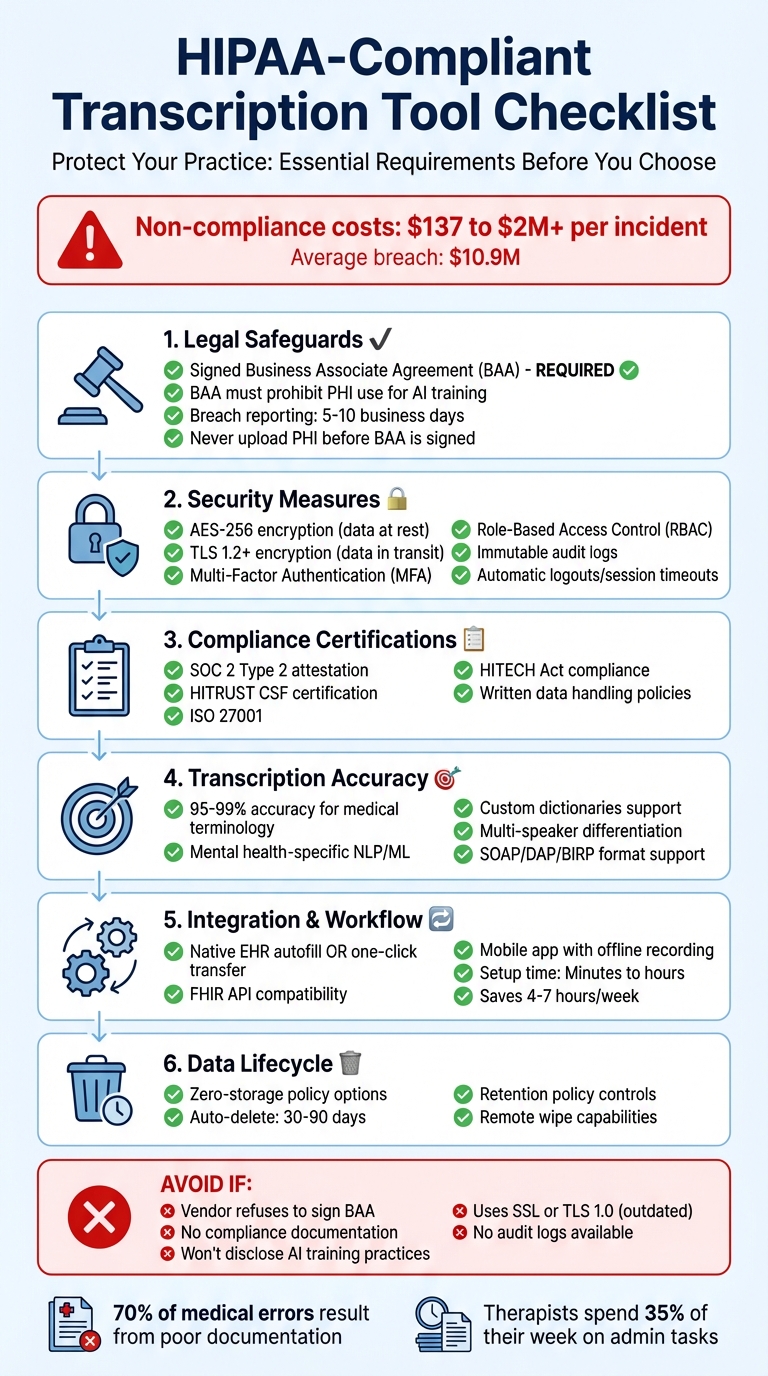
HIPAA-Compliant Transcription Tool Selection Checklist for Healthcare Providers
Building an AI Medical Transcription App (Part 1: The Transcription Engine)
sbb-itb-ce1c1e8
How to Verify HIPAA Compliance
Before uploading any client recordings or session notes to a transcription tool, you need to confirm that it meets federal standards. This involves checking specific documentation and audit evidence. Here’s a breakdown of the essential steps to validate compliance.
Check for a Business Associate Agreement (BAA)
A signed BAA is non-negotiable. It legally binds the vendor to protect PHI (Protected Health Information) and comply with HIPAA regulations. Without this agreement, you could be held personally liable for any breaches or violations caused by the tool.
The BAA should clearly outline how the vendor is permitted to use PHI – typically limited to transcription services – and explicitly forbid activities like marketing or resale. It should also require strong security measures, such as AES-256 encryption and multi-factor authentication. Additionally, the BAA should mandate breach reporting within 5–10 business days and ensure all subcontractors are held to the same HIPAA standards.
If you’re using an AI-powered transcription tool, confirm that the BAA includes a clause prohibiting the use of PHI for training the vendor’s AI models. Never upload PHI or start a trial until the BAA is fully signed by both parties.
Review HIPAA Certifications and Audits
A signed BAA is just the beginning. Certifications and third-party audits provide additional assurance that the vendor has strong security controls in place. While there’s no official "HIPAA certification", reputable vendors often undergo independent audits. Look for SOC 2 Type 2 attestation, which evaluates security practices over a period of time, offering a more thorough assessment than SOC 2 Type 1.
HITRUST CSF certification is particularly valuable since it’s tailored to healthcare and aligns closely with HIPAA requirements. Another important credential to look for is ISO 27001, which demonstrates adherence to global standards for information security management. Request these certifications along with written policies on data handling and disclosures about how the vendor trains its models.
If a vendor refuses to provide this documentation or won’t sign a BAA, consider it a major red flag. Keep in mind that mid-size organizations typically invest between $30,000 and $120,000 annually on HIPAA compliance, so serious vendors will treat these requirements with the importance they deserve.
Ensure HITECH Act Compliance
The HITECH Act complements HIPAA by focusing on electronic health records and strengthening enforcement. It introduced the Breach Notification Rule, which requires vendors to notify you (and regulators) of any data breaches promptly – often within 60 days.
Under HITECH, Business Associates are directly accountable for HIPAA violations, not just contractually obligated. The act also requires detailed audit trails, including tamper-proof logs that document who accessed specific records and when.
Make sure the vendor’s BAA explicitly addresses HITECH compliance and includes an incident response plan with clear notification timelines. Also, ask for evidence of immutable audit logs that track file access, processing, and deletion events. These logs should be permanent and tamper-resistant.
Data Security Features to Look For
After confirming legal agreements and certifications, it’s time to focus on the technical safeguards that ensure the confidentiality of Protected Health Information (PHI) during transmission, storage, and even deletion.
Verify End-to-End Encryption
Encryption plays a critical role in preventing unauthorized access to PHI. Any tool you select should implement AES-256 encryption for data at rest. This ensures that stored information remains secure from potential breaches.
For data in transit, check that the vendor uses TLS 1.2 or higher. Older protocols like SSL or TLS 1.0 have known vulnerabilities and should be avoided. If the vendor cannot confirm support for TLS 1.2 or newer, consider it a red flag.
Here’s why encryption matters: In 2020, a healthcare provider faced a $2.15 million fine for failing to encrypt sensitive patient data, which led to an unauthorized disclosure. HIPAA penalties can range anywhere from $100 to $50,000 per violation, with an annual maximum of $1.5 million per category.
You should also look for tools that employ hardware security modules (HSM) or FIPS-validated cryptography for managing encryption keys. These systems ensure that keys are rotated regularly and protected from unauthorized access. Additionally, set retention policies to automatically delete audio files and transcripts after a specified period – commonly between 30 and 90 days. These measures reinforce earlier compliance efforts by protecting data throughout its lifecycle.
Inspect Access Controls and Audit Logging
While encryption defends against external threats, access controls are vital for preventing unauthorized internal access. The tool you choose should support Role-Based Access Control (RBAC), which limits data visibility based on job roles. For example, a receptionist might only access scheduling information, while clinical notes remain restricted to the therapist.
Multi-Factor Authentication (MFA) is another must-have feature. It adds an extra layer of security, ensuring that even if a password is stolen, it won’t be enough to breach the system. Pair MFA with Single Sign-On (SSO) to simplify and secure user access.
"Systems must track who accessed PHI and when. Audit logs are critical during compliance checks and security investigations."
– ScribeAI
Audit logs should be immutable and capture every access event, including actions like viewing, exporting, transcribing, or deleting data. These logs should answer key questions: Who accessed the data? What did they do? When did it happen? From where? Regularly reviewing these logs can help identify unauthorized or suspicious activity, which is essential for compliance audits and security investigations.
Finally, enable features like automatic logouts and session timeouts to reduce the risk of data exposure on idle devices. For mobile transcription, confirm the tool includes remote wipe capabilities and jailbreak detection to maintain a secure recording environment.
Transcription Accuracy for Therapy Notes
While robust security measures protect your data, transcription errors can undermine the very purpose of documentation. A 2023 study revealed that 70% of medical errors result from poor documentation, with roughly 1 in 5 patient records containing transcription mistakes. For therapists, inaccuracies in session notes can lead to billing issues, compliance risks, and disruptions in continuity of care.
Accuracy with Mental Health Terminology
General speech-to-text tools often fall short when it comes to clinical language. They may misinterpret similar-sounding terms or fail to recognize therapy-specific phrases like cognitive restructuring or EMDR. The most effective platforms leverage Natural Language Processing (NLP) and Machine Learning specifically designed for behavioral health, enabling them to grasp clinical context.
To improve accuracy, choose tools that offer custom dictionaries where you can add facility-specific terminology. While general speech recognition systems typically achieve accuracy rates of 85–90%, specialized medical transcription platforms can hit rates between 95% and 99%. Even AI transcription software tailored for clinical use often exceeds 90% accuracy right out of the box.
Ambient listening technology is another useful feature. It captures natural dialogue while filtering out irrelevant chatter, allowing you to speak naturally without adhering to a rigid dictation style. However, always complete a final review to ensure contextual accuracy. Beyond terminology, organizing these transcriptions into standardized formats is equally important.
Support for Structured Note Formats
Accurate transcription is just the starting point – therapy documentation often follows specific structures like SOAP (Subjective, Objective, Assessment, Plan), DAP (Data, Assessment, Plan), or BIRP (Behavior, Intervention, Response, Plan). The right transcription tool should automatically arrange spoken dialogue into these formats, eliminating the need for manual reformatting.
AI-powered tools can categorize your natural speech into the appropriate sections using template generation. For best results, use clear verbal cues like "Subjective" or "Plan" while dictating.
Advanced features to look for include:
- Multi-speaker diarization: Differentiates between therapist, client, and others in the session.
- SMART goal support: Helps generate measurable treatment objectives.
- Golden Thread continuity: Links session notes to treatment goals and progress tracking, ensuring compliance with insurer requirements.
These tools can save clinicians 4–7 hours per week on documentation tasks.
"My notes get finished after every single session now because Mentalyc makes it so easy. I’m not stressed out about notes and I feel like my notes are of much higher quality."
– Sasha Kendall, Licensed Clinical Social Worker
Healthcare providers spend an average of 36 minutes per patient visit on EHR documentation. Automated structuring tools not only reclaim valuable time but also enhance the quality and consistency of your documentation, streamlining your entire workflow.
Integration and Workflow Compatibility
Transcription tools need to work smoothly with your practice management system. Without proper integration, you risk adding extra administrative tasks, which defeats the purpose of using these tools to save time.
EHR and Practice Management Integration
There are three main ways transcription tools integrate with systems: native EHR autofill, one-click transfer, or manual export. Native autofill is considered the best option because it automatically fills in fields within your practice management system. This can save clinicians between 4 and 7 hours per week compared to traditional note-taking methods.
For systems that aren’t widely used, look for tools that support FHIR API compatibility. This ensures smooth data exchange between the transcription software and EHRs by allowing the tool to pull patient details and push finalized notes without requiring custom development. If native integration isn’t an option, prioritize tools with one-click transfer features. These allow you to move formatted notes – such as SOAP, DAP, or BIRP – into your workflow with minimal hassle.
Mobile accessibility is another key factor. Therapists who work in multiple locations need apps that sync with a web dashboard. For example, Voice CRM only works with iOS, making it a good fit for those using Apple devices. When choosing mobile workflows, make sure the app supports encrypted offline recording. This prevents data loss during poor network conditions and allows you to capture session details on the spot.
Streamlined EHR integration is essential, but pairing it with an easy-to-use setup takes efficiency to the next level.
Ease of Use and Setup
A November 2024 survey revealed that while 50% of clinicians use AI for daily tasks, only 13% use it for client documentation. This gap often comes down to complicated setup processes and clunky interfaces. The best transcription tools are simple to use, allowing therapists to start recording or dictating notes with just a single tap.
Here’s what setting up a transcription tool generally involves:
- Choosing a vendor that signs a Business Associate Agreement (BAA)
- Configuring security features like access controls and encryption
- Integrating the tool with your EHR using an API or browser extension
- Training staff on the new workflow
Some tools are ready to use in minutes, while others may need more in-depth setup and technical integration.
Before committing to a solution, test its interface. Is it intuitive enough to use without a manual? Does it offer voice commands for hands-free operation? Advanced platforms even allow voice-driven navigation, letting you manage records without touching a keyboard. The easier the tool is to use, the more likely your team will adopt it – turning potential time savings into actual efficiency gains. By focusing on both integration and ease of use, you can ensure your transcription tool enhances your clinical workflow rather than complicating it.
Features Beyond Transcription
When your transcription tool seamlessly integrates with your EHR, it doesn’t just stop at converting voice to text – it transforms how you manage your practice. The best tools combine transcription with practice management, eliminating the need to juggle multiple platforms. By consolidating everything into one secure system, you can spend less time on paperwork and more time focusing on your clients.
Practice Management Tools in Voice CRM
Voice CRM goes beyond transcription by offering a comprehensive suite of practice management features. It combines secure client management, session tracking, and financial tools into one centralized platform. Here’s a closer look at what it offers:
- Client Management: Keep all session histories and notes securely stored in one place.
- Supervision Tracking: Create cases tailored to individual client needs or broader practice inquiries.
- Payment Tracking: Monitor fees and unpaid sessions with ease.
Voice CRM also includes tools like mood tracking and thematic tagging to enhance client care. Mood tracking helps you document a client’s emotional state after each session, creating a visual timeline of their progress. Thematic tagging allows you to organize sessions with custom tags, making it easier to spot recurring themes in your practice. On top of that, a financial analytics dashboard provides an at-a-glance view of your practice’s profitability, tracking income alongside supervision-related expenses.
Voice CRM offers three subscription tiers to fit practices of all sizes:
- Basic Plan: Includes essential features like voice-to-text transcription, client management, payment tracking, mood tracking, and thematic tagging.
- Professional Plan: Adds supervision tracking, financial analytics, and smart reminders – ideal for growing practices.
- Enterprise Plan: Includes all Professional features, plus custom integrations and priority support for larger organizations.
All plans are HIPAA-compliant and feature strong end-to-end encryption, ensuring client data stays secure.
One standout feature is the smart reminders, which prompt you to log notes and payments right after a session. This ensures you capture important details while they’re fresh. Considering therapists often spend up to 35% of their week on administrative tasks, this feature alone can be a game-changer. By consolidating transcription, client records, financial tracking, and supervision management, Voice CRM can save clinicians over 10 hours a week. That’s more time to focus on what truly matters – your clients.
Pricing and Support Considerations
When it comes to choosing an AI transcription tool, pricing and support are just as critical as ensuring HIPAA compliance. Opting for a tool based solely on cost can backfire. Free tools that aren’t compliant can lead to hefty HIPAA fines ranging from $137 to over $2 million per incident, with the average breach costing $10.9 million. On the bright side, AI transcription services generally cost 60–80% less than traditional human transcription, which typically runs between $75 and $150 per hour of audio.
Compare Pricing Plans
The right pricing plan depends on the size and needs of your practice. Solo practitioners often find lower-tier monthly subscriptions sufficient, while larger practices or high-volume users may benefit from unlimited plans or enterprise tiers. These higher-level plans often include essential features like administrative controls and audit logs, making them a better fit for group practices. Whatever plan you choose, make sure it includes a signed Business Associate Agreement (BAA) to shift legal responsibility for data protection to the vendor.
Voice CRM provides three subscription tiers tailored to different practice sizes:
- Basic Plan: Ideal for solo practitioners, covering essentials like voice-to-text transcription, client management, payment tracking, mood tracking, and thematic tagging.
- Professional Plan: Adds advanced features such as supervision tracking, financial analytics, and smart reminders.
- Enterprise Plan: Designed for larger organizations, offering all Professional features plus custom integrations and priority support.
All plans are HIPAA-compliant and include end-to-end encryption to ensure data security.
While pricing is important, the value of a tool also depends on the quality of its support and the flexibility of its features.
Evaluate Support and Customization
Strong customer support and adaptable features can make or break your experience with an AI transcription tool. During a trial period, test how responsive the vendor’s support team is, particularly for complex needs like EHR integration. Also, evaluate whether the AI can adapt to your clinical terminology, reducing the need for manual corrections.
Look for tools with zero-storage policies, meaning audio recordings are automatically deleted after transcription, to further protect sensitive data. Additionally, ensure the tool supports clinical documentation formats like SOAP, DAP, BIRP, or GIRP without requiring complicated setup.
For practices offering couples or family therapy, confirm that the tool can differentiate between multiple voices to keep records accurate. Group practices should also prioritize platforms with role-based access controls, allowing administrators to manage permissions across multiple clinicians.
Final Checklist
Selecting a HIPAA-compliant transcription tool is about more than just avoiding penalties – it’s about protecting your practice and maintaining your professional reputation. One key step is ensuring the vendor provides a signed Business Associate Agreement (BAA), which confirms their legal responsibility for safeguarding sensitive data.
Efficiency in your workflow is another critical factor. Look for features like encryption (TLS 1.2+ for data in transit, AES-256 for data at rest), role-based access controls, multi-factor authentication, and audit logs to keep everything secure and streamlined. The tool should also handle mental health-specific terminology with precision and support structured notes such as SOAP, DAP, or BIRP formats. If you work with couples or families, check for multi-speaker differentiation capabilities. EHR integration is another must – whether through native autofill or simple export options, it can significantly reduce administrative workload.
"One wrong upload could cost you more than money; it could cost you your license and reputation." – Supanote
Additional safeguards are equally important. Confirm that the tool offers a zero-storage policy for audio files and explicitly states that your data will not be used to train AI models. Responsive customer support and the ability to adapt to your specific clinical workflow are also crucial. Keep in mind that non-compliance can lead to severe consequences, including fines of up to $1.5 million per violation category and breaches that can exceed $10 million.
FAQs
How can I confirm a transcription tool is HIPAA-compliant?
To confirm that a transcription tool meets HIPAA compliance, look for essential features such as end-to-end encryption (covering both data in transit and at rest), a signed Business Associate Agreement (BAA), role-based access controls, and audit trails to monitor access and modifications. It’s also important to ensure the tool adheres to HIPAA’s Privacy and Security Rules. This includes secure data storage, reliable backup systems, and robust user authentication. These safeguards play a crucial role in keeping patient information secure.
What should I ask about AI training on my client recordings?
When choosing transcription tools, it’s important to find out if your client recordings are being used to train AI models. Make sure the platform provides an option to opt out of having your data included in such training. Transparent policies on how data is handled are crucial for maintaining HIPAA compliance and safeguarding client confidentiality.
How can I reduce PHI risk after transcription is done?
To reduce the risk of exposing protected health information (PHI) after transcription, it’s crucial to handle data with care. Start by storing transcripts on encrypted servers and implementing strict data retention policies to avoid keeping information longer than necessary. Use HIPAA-compliant tools that encrypt data during storage and transmission, delete recordings promptly, and include signed Business Associate Agreements (BAAs).
Additionally, limit access to sensitive data through role-based permissions, ensuring only authorized personnel can view or edit information. Regularly monitor compliance with these measures to maintain the highest level of security for PHI.