Therapists spend up to 480 hours annually on documentation, which can be overwhelming. Voice CRM offers a solution by automating session notes and progress tracking, saving time while maintaining compliance with HIPAA regulations.
- Voice-to-Text Notes: Dictate notes 3x faster than typing, reducing documentation time by 60%. Notes are auto-organized into clinical formats like SOAP and DAP.
- Mood Tracking: Automatically analyzes emotions and symptoms from notes, highlighting trends without extra surveys.
- Visual Dashboards: Quick overviews of client progress with linked session data for easy reference.
- Smart Reminders: Reduces no-shows by 30–40% with automated SMS and email alerts.
- Financial Insights: Tracks revenue, clinician performance, and billing patterns to optimize practice operations.
- HIPAA Compliance: Ensures data security with encryption, audit trails, and immediate deletion of audio files.
Voice CRM simplifies client management, enhances documentation accuracy, and provides actionable insights – all while freeing up more time for therapists to focus on care.
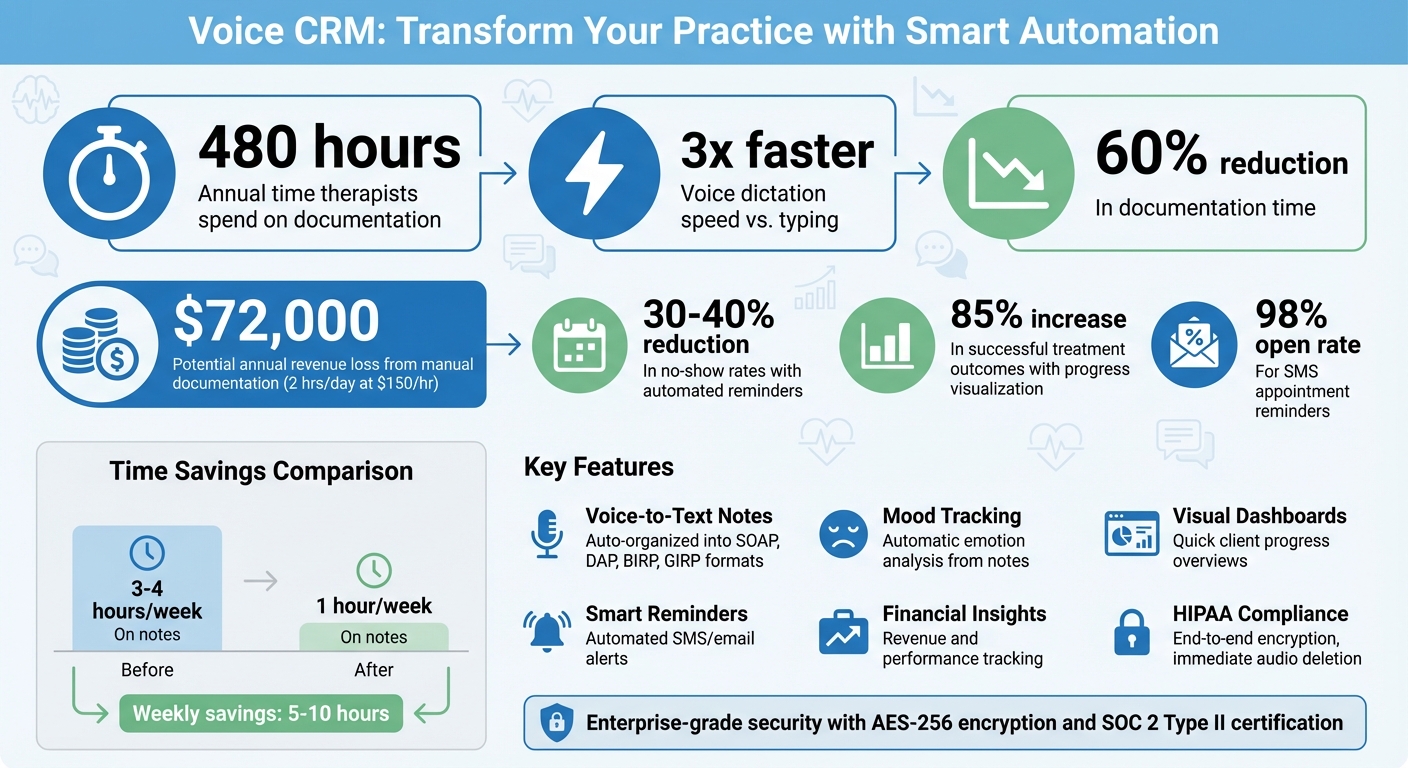
Voice CRM Benefits: Time Savings and Performance Metrics for Therapists
Using Voice-to-Text Technology for Session Notes
How Voice-to-Text Reduces Documentation Time
Did you know that speaking can be up to three times faster than typing? For mental health professionals juggling heavy documentation loads, this speed difference can save between 5 and 10 hours each week. That’s a game-changer for anyone trying to balance client care with administrative tasks.
With Voice CRM, therapists can dictate session notes in the 5–10 minute gap between appointments, while the details are still fresh. This process can cut documentation time by as much as 60%. Plus, the platform does the heavy lifting by automatically organizing these dictated notes into standard clinical formats like SOAP, DAP, BIRP, and GIRP. This ensures the notes meet insurance requirements – no manual formatting needed.
"I went from 3–4 hours a week of notes to 1 hour at most … that alone is invaluable personally and professionally." – Kara-Myung Jin Purves, Licensed Marriage and Family Therapist
Security is a top priority, too. The system uses end-to-end encryption and immediately deletes audio after processing it into text to comply with HIPAA regulations. On top of saving time, Voice CRM also helps therapists gain deeper insights by identifying key themes from sessions automatically.
Tracking Progress with Thematic Tags
Another standout feature of Voice CRM is its ability to track client progress using thematic tags. The platform identifies recurring themes, shifts in symptoms, and progress toward goals. These insights are displayed in visual dashboards, giving therapists a clear view of client development over time – no need to sift through old notes or administer additional questionnaires.
Each transcribed note is linked directly to specific treatment goals, helping therapists spot trends like improvements in emotional regulation or coping skills. This makes it easier to detect subtle changes that might indicate progress – or even setbacks – across sessions. By simplifying this process, Voice CRM allows professionals to focus more on client care and less on paperwork.
sbb-itb-ce1c1e8
Setting Up Automated Mood and Progress Tracking
Voice CRM takes progress tracking to the next level by incorporating automated mood analysis, making it easier to monitor client well-being without additional effort.
Configuring Mood Tracking Features
Voice CRM simplifies mood tracking by analyzing client emotions directly from your session notes – no extra surveys or forms required. This method reduces client fatigue while still providing the essential clinical insights you need.
The platform identifies key indicators such as symptom frequency, intensity, and distress levels based on your dictated notes. For example, if a client reports increased anxiety or mentions sleeping better, Voice CRM flags these details and tracks them over time. By focusing on two to four core symptoms per client – like panic attack frequency or overall mood stability – you can capture meaningful trends without overwhelming amounts of data.
"Progress tracking is not just about improvement. It is also about identifying when treatment is stalled, recognizing when a change in approach is needed, and noticing subtle improvements that clients may overlook."
- Tracy Collins, LCP
These insights are then seamlessly fed into visual dashboards for a clear and immediate overview.
Using Data Dashboards to View Progress
Once Voice CRM processes your session notes, it generates instant visual dashboards that map out the "arc of care" across sessions. These dashboards help you quickly assess whether improvements are sustained or temporary, and whether treatment strategies need adjusting.
Each data point on the dashboard is linked to its corresponding session content – clicking on a peak or dip in the graph pulls up the related clinical details. This feature eliminates the need for time-consuming file reviews, streamlining your documentation process. Additionally, Voice CRM tracks the therapeutic alliance, which is a strong predictor of successful outcomes.
"I bring a sense of continuity from session to session because of the really good summary and progress notes."
- Stanley LeMelle, Licensed Marriage and Family Therapist
Managing Client Records and Automated Reminders
Voice CRM takes the hassle out of paperwork by centralizing client data, giving you more time to focus on what matters most. With its automated progress tools, this platform simplifies client management by consolidating everything into a single, easy-to-navigate dashboard. No more juggling between different data sources – client contact details, session history, clinical notes, and payment statuses are all accessible in one place. This streamlined system lets you view and update records instantly, saving you the headache of sifting through folders or endless documents.
Organizing Client Information in One Place
Voice CRM doesn’t just store data; it provides meaningful insights. For example, it tracks performance metrics like cancellation rates and client retention automatically. One practice owner analyzed three years of clinician performance and found a 41% average retention rate, with 59% of 150 clients ending treatment before their eighth session. These insights can help you spot trends, such as frequent drop-offs before treatment goals are met or a decline in session attendance.
To keep things professional and organized, the system separates clinical notes from administrative details. Need to highlight something important? Use "sticky notes" to pin crucial details at the top of a client’s chart, ensuring they’re front and center during sessions. On the billing side, the dashboard makes invoicing a breeze. You can send estimates, convert them into invoices with one click, and track payment statuses in real time – from "Estimate sent" to "Invoice paid".
Setting Up Smart Reminders
Voice CRM doesn’t stop at organization – it also tackles no-shows with automated reminders. These reminders have been shown to reduce no-show rates by 30% to 40%, cutting down on the need for manual follow-ups. The system sends SMS (with an impressive 98% open rate) and email reminders 48 and 24 hours before appointments. Plus, messages are only sent during daytime hours (8 AM to 7 PM) for maximum effectiveness.
Automation makes personalization easy, too. Dynamic fields automatically insert each client’s first name, appointment details, and provider name into messages, so you don’t have to do it manually. Beyond appointment reminders, the system can also send alerts for incomplete documents or pending intake forms, ensuring your practice stays on track without constant oversight.
Using Financial Analytics to Track Practice Performance
Voice CRM doesn’t just streamline client records and automate reminders – it also provides a powerful way to monitor your practice’s financial health.
With financial analytics, you can uncover patterns in client engagement and operational efficiency. Voice CRM’s built-in dashboards offer a real-time snapshot of how your practice is performing, connecting financial outcomes directly to client care. These insights can help you track revenue more effectively and make workflow adjustments when needed.
Monitoring Session Trends and Revenue
Voice CRM simplifies revenue tracking by focusing on the date of service rather than when payments are received. This approach avoids delays or inaccuracies caused by insurance processing timelines. As Tory Krone, LCSW at PracticeVital, points out:
"Most EHRs display revenue based on when the payment was received, which can delay or skew your financial reporting… PracticeVital solves this problem by displaying revenue based on the date of service".
The platform also analyzes the profitability of different billing codes and clinician performance. For example, if 53-minute sessions (90837) consistently generate more revenue than 38-minute sessions (90834), you can adjust scheduling to focus on higher-revenue activities.
Adjusting Practice Workflows Based on Data
Voice CRM takes financial insights a step further by helping you refine operations with real-time analytics.
These tools highlight inefficiencies early. By tracking clinician utilization – measuring completed sessions against a therapist’s goals – you can identify whether additional marketing is needed or if a clinician might be overworked. For instance, a practice with 10 therapists operating at 100% utilization is often more profitable than one with 20 therapists at 50% utilization, due to reduced overhead costs.
You can also monitor average revenue per session to maintain a healthy balance of payer sources. Filtering appointments by "revenue collected" allows you to quickly spot missing or partial payments without the hassle of manual spreadsheets. Together, these analytics empower you to make real-time adjustments, ensuring your practice stays efficient and financially sound.
Maintaining HIPAA Compliance and Data Security
Safeguarding sensitive client data is critical for effective progress tracking and legal compliance. Mental health professionals using non-compliant tools risk hefty penalties – HIPAA fines can climb as high as $1.5 million per violation category. Since 2003, the Office for Civil Rights has issued over $134 million in HIPAA-related fines.
Voice CRM helps mitigate these risks with advanced security features tailored for mental health practices. The platform employs end-to-end encryption (AES-256) for stored data and TLS 1.2 for data in transit, ensuring that client information remains secure – even if intercepted. To further bolster compliance, every user is provided with a signed Business Associate Agreement (BAA). As expert Whisperit succinctly states:
"No BAA means no compliance, period."
Let’s dive into the key security features that protect client data.
Required Security Features for Client Data
Voice CRM integrates essential security measures designed for mental health professionals. Role-based access permissions ensure that only authorized personnel can access specific client records. Meanwhile, multi-factor authentication adds an extra layer of security beyond traditional passwords. The platform also maintains detailed audit trails, logging all data access, edits, and sharing activities, complete with user IDs and timestamps. This allows for robust monitoring and frees up your time to focus on patient care rather than administrative tasks.
For practices utilizing voice-to-text features, Voice CRM takes privacy a step further by deleting raw audio files immediately after transcription. This minimizes the risk of breaches and ensures that client conversations are not repurposed for AI training. Additionally, the platform’s SOC 2 Type II certification confirms its security controls have been rigorously evaluated by independent auditors.
With these safeguards in place, Voice CRM ensures your practice can operate securely and efficiently.
Choosing the Right Plan for Your Practice
Voice CRM offers three flexible plans to meet the needs of practices of all sizes:
- Basic Plan: Perfect for solo practitioners, this plan includes HIPAA-compliant essentials like voice-to-text transcription, client management, and encrypted data storage.
- Professional Plan: Designed for small teams, it adds features like supervision tracking and financial analytics to support growing practices.
- Enterprise Plan: Tailored for larger organizations, this option includes advanced security, custom integrations, and priority support.
Every plan comes with core security features – end-to-end encryption, signed BAAs, detailed audit trails, and immediate deletion of audio files – ensuring that even solo practitioners benefit from enterprise-grade protection without paying for unnecessary extras.
Conclusion
Voice CRM brings together voice-to-text capabilities, automated mood tracking, and financial analytics into one HIPAA-compliant platform. It’s designed to reduce documentation time while improving the quality of care.
By cutting down on manual processes, this tool saves time and boosts revenue potential. For example, AI-powered documentation tools can slash charting time by up to two-thirds. Think about this: therapists who spend 2 hours a day on manual notes lose around 480 hours a year. At a rate of $150 per hour, that’s nearly $72,000 in potential revenue left on the table. Plus, using progress visualization methods has been linked to an 85% increase in successful treatment outcomes.
Voice CRM simplifies administrative tasks with features like thematic tagging, visual dashboards, and smart reminders. It records session notes through voice input, tracks mood trends with easy-to-read charts, and provides transparent financial insights. All of this is backed by enterprise-grade security, including end-to-end encryption and signed Business Associate Agreements.
But it doesn’t stop there. The platform bridges the gaps between sessions with automated mood tracking, delivering real-time data on triggers – no extra questionnaires required. This keeps you informed about client progress without adding to your workload. As Stanley LeMelle, a Licensed Marriage and Family Therapist, puts it:
"It improves the quality of my work as I review my sessions … I bring a sense of continuity from session to session because of the really good summary and progress notes".
FAQs
How accurate is voice-to-text for therapy notes?
Voice-to-text technology for therapy notes can deliver impressive accuracy when it’s specifically designed with therapists in mind. Its success largely hinges on the quality of the software and how seamlessly it fits into your daily routine. Well-crafted systems can minimize mistakes, ensure better compliance, and make documentation faster and more efficient.
Can I customize SOAP/DAP templates and goal tags?
Yes, you can customize SOAP/DAP templates and goal tags to fit your specific documentation requirements. This adaptability allows you to align your notes with your practice’s unique needs while simplifying your workflow.
How does Voice CRM protect client data and stay HIPAA-compliant?
Voice CRM prioritizes client data protection and adheres to HIPAA regulations by encrypting voice recordings and transcripts as they are created. To further ensure security, it signs Business Associate Agreements (BAAs) and implements multiple layers of defense to guard against potential data breaches.